Wireless Mouse - Black

€7.90

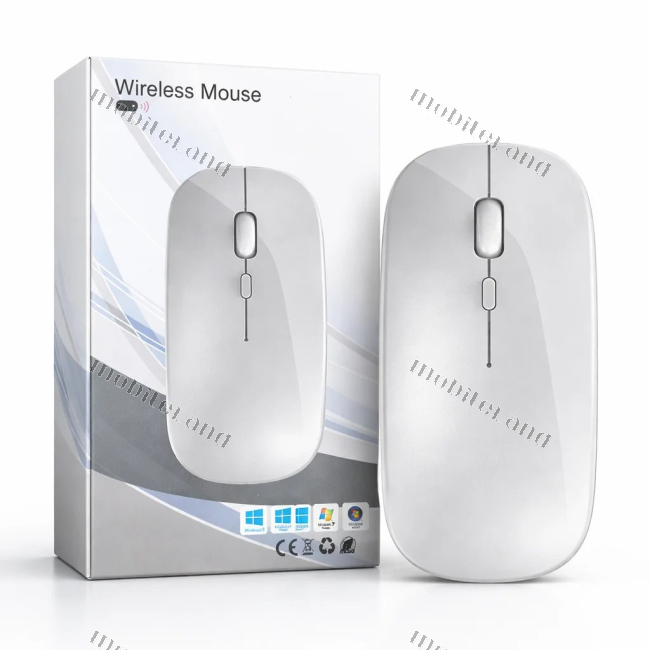
Wireless optical mouse in black with 2.4 GHz nano receiver and a range of up to 10 meters. Thin, symmetrical design suitable for both left-handed and right-handed users.

Availability:
In stock
SKU
1084674

Image is for reference — the product name and specification are authoritative.

Delivery to your address — anywhere in Montenegro
Everything we offer can be ordered online.
Delivery in 2 business days Free delivery over 20€ Cash on delivery
Also check our stores
Currently not in stores
Bar
Store 1 - centar Out of stock
Vladimira Rolovića F42/c, 85000 Bar
Store 2 - centar Out of stock
Vladimira Rolovića F3, 85000 Bar
Šušanj Out of stock
4. proleterske crnogorske brigade bb, 85000 Šušanj, Bar
Other cities
Budva Out of stock
HDL Laković · 1st floor
Ul. 4. Proleterske bb, 85310 Budva
Nikšić Out of stock
HDL Laković · at the entrance
Bulevar 13. jula, 81400 Nikšić
Herceg Novi Out of stock
HDL Novi Mall · upstairs
Jadranski put bb, Sutorina, 85340 Herceg Novi
Kotor - Radanovići Out of stock
HDL 365 Laković · at the entrance
Industrijska Zona, 85318 Radanovići

Wireless Mouse — a tidy desk without cables

Wireless mouse in black is a simple solution for anyone who wants a tidy workspace without cables getting in the way. The nano receiver plugs into a USB port and stays there — it's small enough to remain permanently connected, so you don't need to remove it when carrying your laptop. The 2.4 GHz connection with a range of up to 10 meters means the mouse works even when you're a little further away from the device, such as when your laptop is connected to a TV.

The thin and symmetrical body makes it convenient to carry: it fits into a laptop bag compartment without getting in the way, and the matte black plastic doesn't show fingerprints and remains tidy even after prolonged use. The symmetrical design also means that both left-handed and right-handed users can use it without any difference, which is practical when sharing a computer in an office or at home.

An additional button under the scroll wheel allows you to change the cursor sensitivity — faster movement when working on a large screen, slower and more precise when searching for smaller details. Along with the classic buttons and scroll wheel, this is a mouse for everyday work: documents, spreadsheets, internet browsing, online classes, and work on the go.

Key Features

  • Wireless Connection: 2.4 GHz connection via a small USB nano receiver that stays in the USB port.
  • Range up to 10 meters: the mouse works reliably even when you're further away from the device, e.g., when the laptop is connected to a TV.
  • Symmetrical Design: thin and low-profile design fits equally well in the right and left hand.
  • Matte Finish: black matte plastic that doesn't retain fingerprints and stays tidy during use.
  • Adjustable Sensitivity: an additional button under the scroll wheel allows you to quickly switch cursor speed.
  • Compact for Carrying: fits into a laptop bag compartment without getting in the way on the go.
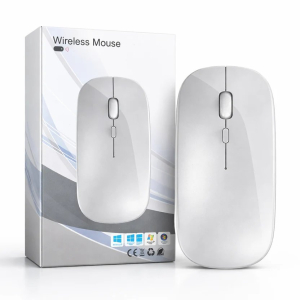
ColorBlack, Matte Finish
ShapeThin, Low-Profile, Slightly Curved, Symmetrical
ReceiverUSB Nano Receiver
PackagingWhite Cardboard Box
Box LabelsCE, Recycling Symbol, WEEE, Windows Operating System Labels
Intended UseComputer and Laptop
Product TypeWireless Optical Mouse
Scroll WheelLocated at the Top, Between the Buttons
Wireless RangeUp to 10 meters
Housing MaterialMatte Plastic
Additional ButtonSwitches Cursor Sensitivity
Connection MethodWireless, 2.4 GHz
Left and Right ClickSingle Top Panel Divided by a Line in the Middle

Frequently asked questions

Which operating systems are compatible with this mouse?

The packaging indicates compatibility with Windows 7, Windows 8, Windows 10, and Windows 11 operating systems.

How does the mouse connect to a computer?

It connects wirelessly via 2.4 GHz using a tiny USB nano receiver that plugs into the USB port and can stay there permanently.

Is the design suitable for left-handed users?

Yes, the mouse has a symmetrical, thin, and low profile shape, allowing both left-handed and right-handed users to operate it equally.

What is the purpose of the button below the scroll wheel?

That button allows you to quickly switch cursor sensitivity, letting you choose faster movement on large screens or slower, more precise tracking for details.

What is the range of the wireless connection?

The wireless connection has a range of up to about 10 meters, so the mouse works reliably even when you are further away from the device.

Write Your Own Review
You're reviewing:Wireless Mouse - Black
Your Rating

Similar products